iMAS: The Premium Actionstep to iManage Integration by WorkCloud
iMAS: The Premium Actionstep To iManage Integration By WorkCloud
iMAS is a premium integration between Actionstep and iManage, purpose-built by WorkCloud’s team of experienced iManage implementation specialists. As an iManage partner that uses iManage every day, we understand how law firms work and what they expect from a truly seamless integration. Designed with deep product expertise and real-world experience, iMAS delivers the functionality, reliability, and ongoing support that firms need to maximise the value of both platforms.
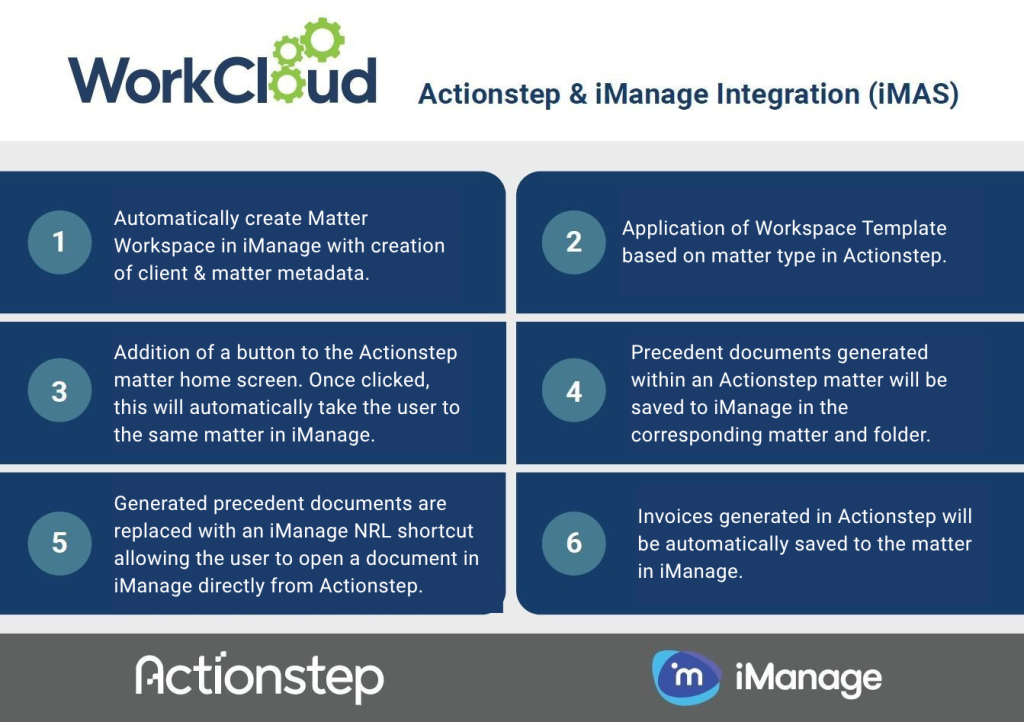
Not All Integrations Are Created Equal
While many integrations simply move data from one system to another, iMAS has been designed by a team that understands how law firms actually use iManage. As experienced iManage and Actionstep implementation specialists, we’ve built an integration that reflects best practice document management, supports the workflows firms rely on, and delivers a more seamless user experience than the standard native Actionstep to iManage integration. The result is a smarter, more considered integration that helps firms get the most from both platforms. See how the integrations compare below.*
Key:
× = Not Supported / Not Available ▲ = Partially Supported / Partially Available √ = Supported / Available
| Feature | Actionstep Native Integration | WorkCloud iMAS |
| Workspace template prefix applied | × | √ |
| Client & Matter metadata mapped *1 | √ | √ |
| In-Matter iManage workspace view *2 | √ | × |
| Workspace security (default and explicit) applied on matter creation | √ | √ |
| iManage folder / sub-folder class and subclass applied on matter creation | × | √ |
| iManage optional folders applied on matter creation *3 | ▲ | √ |
| Search folders honoured from iManage workspace template when matter is created *4 | × | √ |
| Workspace tabs honoured from workspace template *5 | × | √ |
| Actionstep invoices saved to iManage *6 | × | √ |
| InfoTrack searches (via Konekta) saved to iManage *7 | × | √ |
| Author recorded for documents generated from templates *8 | ▲ | √ |
| Multi-library support | × | √ |
| Matter type mapped on matter creation *9 | √ | √ |
| Matter sub-type mapped on matter creation *10 | × | √ |
| Automatic updates on Actionstep matter name change *11 | ▲ | √ |
| iManage workspace owner assignment *12 | ▲ | √ |
| Matter closure reflected in workspace name *13 | ▲ | √ |
| File Reference, Priority and Status fields supported | √ | √ |
Comparison Explanatory Notes
*Feature comparison based on WorkCloud testing of the Actionstep native integration and WorkCloud iMAS. Current as at July 2026.
*1 Client & Matter metadata refers to iManage ‘Custom 1’ and ‘Custom 2’ (C1 & C2) values.
*2 The iManage Workspace is embedded via an iFrame in the native Actionstep integration. This functionality is not available in iMAS. A button allowing users to open the iManage workspace in a separate browser tab is provided instead.
*3 Our testing indicates that the native Actionstep integration creates ALL folders configured in the iManage workspace template (both requried and optional folders) on matter creation. iMAS honours the workspace template setup and only creates required folders on matter creation.
*4 Our testing indicates that the native Actionstep integration does not honour folders configured as ‘search’ folders in the iManage workspace template and instead creates these as standard folders on matter creation. By contrast, iMAS correctly honours search folders.
*5 Our testing indicates that the native Actionstep integration does not honour workspace tabs as configured in the iManage worskpace template and instead creates these as standard folders on matter creation. By contrast, iMAS correctly honours workspace tabs.
*6 Our testing indicates that invoices created in Actionstep are saved to the native ‘Client Invoices’ folder in the Actionstep DMS and that these are not pushed through to iManage via the native integration. Users would only be able to view the saved invoices in Actionstep if the option to hide the native DMS is disabled, thereby mitigating the benefit of the iFrame workspace view. By contrast, iMAS correctly pushes invoices generated in Actionstep through to the corresponding folder in iManage.
*7 Our testing indicates that InfoTrack searches (ordered via Konekta) are saved to the native ‘_Searches’ in the Actionstep DMS and that these are not pushed through to iManage via the native integration. Users would only be able to view the searches in Actionstep if the option to hide the native DMS is disabled, thereby mitigating the benefit of the iFrame workspace view. By contrast, iMAS correctly pushes searches through to the corresponding folder in iManage.
*8 Our testing indicates that the native Actionstep integration records the system account as the author of documents generated from Actionstep templates. By contrast, iMAS records the author as the current system user.
*9 This refers to the iManage ‘Custom 29’ (c29) value.
*10 This refers to the iManage ‘Custom 30’ (C30) value.
*11 Our testing indicates that on changing / updating a matter name in an Actionstep matter, the native integration removes the matter ID and does not update the C2 value in the corresponding iManage workspace. By contrast, iMAS ensures that all changes are reflected in the corresponding iManage workspace.
*12 Our testing indicates that the native Actionstep integration will automatically apply the iManage Admin / Service Account as the worskpace owner for all iManage workspaces created by the integration. By contast, iMAS will apply the ‘Assigned To’ user in Actionstep as the workspace owner by default, ensuring consistency across both systems. Alternately, iMAS allows the application of the workspace owner to be customised to a different system account, provided the account email address exists in both Actionstep and iManage.
*13 Our testing indicates that the native Actionstep integration will only apply a fixed prefix text to an iManage workspace name when a matter is closed in Actionstep. By contrast, iMAS will apply the word ‘CLOSED’ with the closed date as a suffix to the workspace name. This can also be customised to be a prefix or suffix with / without the date. The closure date can also be automatically recorded separately in an available iManage custom data field.